Backing up BTP with Terraform
One click and it's all gone – back up your BTP environment so that mistakes don't turn into disasters

Felix Frank & Nail Karaduman
SAP Technology
Why back up your BTP infrastructure?
Some of you will have experienced it already: one careless click and a crucial component within the BTP has been accidentally deleted. Be it an instance, a subscription or a user. But which parameters were set? Which roles were assigned?
- SAP currently offers no solution for restoring deleted resources in the BTP, which makes third-party tools a must.
Can I back up and protect my BTP infrastructure?
In short: yes! Any BTP infrastructure can be backed up, regardless of whether your global account / subaccount has yet to be created or has already grown in line with your requirements. The backup covers all entitlements, subscriptions, instances, environments, etc. – even Cloud Foundry resources can be backed up.
Since the backup focuses on the architecture and settings of your BTP platform, the data within the applications cannot be backed up directly. This application data is protected by a tailored disaster recovery plan that ensures reliable restoration.
What is Terraform?
Terraform is a cloud-agnostic, open-source infrastructure as code tool that lets you provision and manage cloud resources in parameterised form. Originally developed for the big cloud players such as AWS, Azure and GCP, Terraform is increasingly finding its way into the SAP world. With its uniform configuration language and repeatability, Terraform simplifies and accelerates the deployment of a wide range of resources.
Thanks to its modular design, Terraform can be flexibly extended with so-called providers. SAP has developed its own BTP provider for this, based on the BTP CLI. This means that every resource that can be controlled via the BTP CLI can also be managed with Terraform. We have been following the development of this provider since the first beta version and have actively contributed to its further development through our feedback.
Figure 1 Overview of all manageable resources
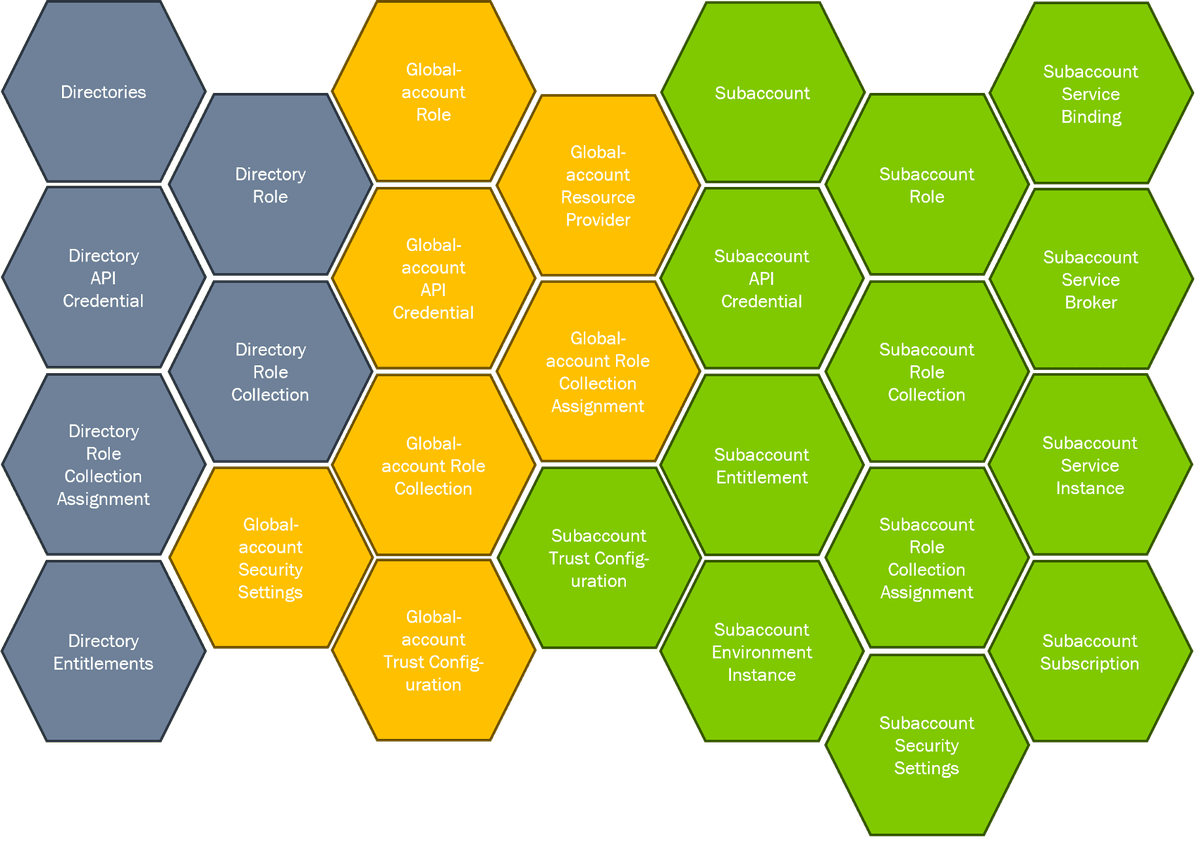
- With Terraform, we obtain a comprehensive text-based representation of your BTP infrastructure, which enables us to detect and fix changes to the infrastructure.
What is required to back up the infrastructure?
Your BTP infrastructure can be backed up in two ways: either directly when a subaccount is created, or by exporting existing resources and then automatically generating the Terraform configuration.
When a subaccount is created, all required resources are captured manually and combined into a comprehensive Terraform configuration. Using variables within the configuration makes it flexible and universally applicable. This approach is ideal when a subaccount is being built from scratch.
For existing subaccounts, on the other hand, automated generation offers an efficient alternative. All relevant resources – such as entitlements, runtime environments, subscriptions and more – are captured and stored in a local, reusable representation of the infrastructure. This representation can be used to restore or replicate the subaccount.
- The automated solution is particularly useful if you want to use a subaccount as a template for creating further environments – such as development, test or sandbox systems.
Keep your BTP resources under control – Terraform as the key to governance
In addition to backups, Terraform also lets you enforce governance. For example, you can enforce your naming conventions, limit the number of resources or manage users, so that you always keep track of your infrastructure and it remains traceable at all times.
An uncontrolled environment frequently leads to chaotic, confusing “sprawl”. With the implementation, you can have resources validated before they are actively used in your BTP, which avoids adjustments later on that are often difficult. Can you say off the top of your head how many users have the Subaccount Admin role? With Terraform, you keep track. The provisioning of resources can also be restricted, allowing you to keep your infrastructure costs under control.
- Your benefits of governance with Terraform at a glance:
- Validation of all resources before provisioning
- Full cost control
- Compliance with your company's naming conventions
- Clear user administration
- Quickly replicable with Terraform and expandable to further subaccounts
Your path to implementing Terraform
Approach:
1. Proof of Concept
We demonstrate how fast and simple backups with Terraform are.
2. Concept design
Jointly developing a concept for the backup process, the backup interval and the recovery process
3. Implementation
Delivery of the end-to-end backup solution, taking into account your framework conditions and the concept
4. Operations
AMS: We look after your backups, restores and follow-up work, while you continue to focus on your core business.
Enablement: we train you in working with Terraform and hand over the administrative tasks around backup and recovery to you.
Whichever you choose, you no longer need to worry about accidentally deleted resources and can restore them with ease.
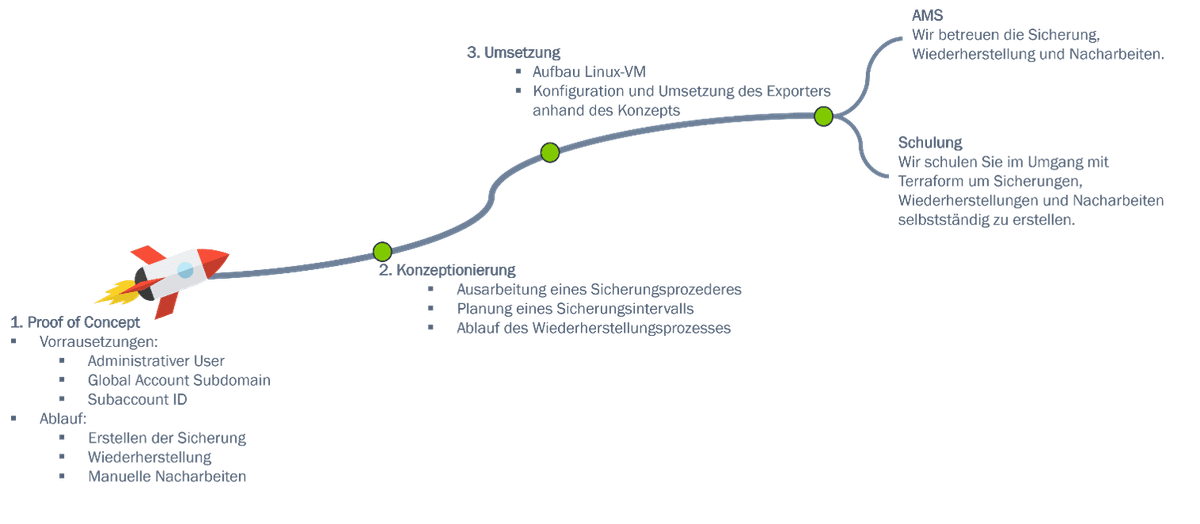
- Figure 2 Implementation of the infrastructure backup
Conclusion – Terraform is more than a tool for hyperscalers – it is the ideal complement for secure, structured management of SAP BTP. As the platform itself does not support infrastructure backups, Terraform not only protects against data loss or unwanted changes but also simplifies deployment and the expansion of your environment. With our solution, we back up your BTP infrastructure regularly and guarantee fast recovery, so that you are always on the safe side.